UPSC CSE New Rules 2026: Notification Highlights, Application Process & Mistakes to Avoid
The UPSC Civil Services Examination (CSE) 2026 Notification was officially released on 4 February 2026, marking the beginning of the new exam cycle. As per the notification, UPSC has announced approximately 933 vacancies, and the online application window remains open till 24 February 2026 (6:00 PM).
However, UPSC Notification 2026 is not just about dates and vacancies. This year, UPSC has introduced multiple new procedural rules, including major updates in the online portal, profile management system, identity verification, and restrictions for already allocated officers.
For every aspirant, especially first-timers, understanding these changes is crucial before filling the UPSC form.
UPSC CSE 2026 Notification PDF English
UPSC CSE 2026 Notification PDF Hindi
UPSC CSE 2026: Key Dates & Vacancy Snapshot
Here is a quick overview of the most important details mentioned in the UPSC Notification 2026:
- Notification Release Date: 4 February 2026
- Last Date to Apply: 24 February 2026 (till 6:00 PM)
- Vacancies Announced: Approx. 933 posts
- Mode of Application: Online only
- Official Portal: upsconline.nic.in
UPSC New Rules 2026: What Has Changed This Year?
UPSC has introduced several important changes in the Civil Services Examination 2026 cycle. These changes mainly affect:
- How candidates register
- How personal data is stored
- How identity verification happens
- What cannot be edited after submission
- Who is eligible to reappear after allocation
Let us understand each change in detail.
UPSC CSE Exam Updates
1) UPSC Online Portal Now Has 4 Separate Cards / Modules
One of the biggest updates in UPSC CSE 2026 is the redesigned online portal.
Earlier, candidates used the old One Time Registration (OTR) system. But now UPSC has replaced it completely and introduced a new portal with four cards.
The 4 Cards in the UPSC Online Application Portal
Card 1: Account Creation
This is the first step where candidates register using:
- Email ID (OTP verification)
- Mobile number (OTP verification)
- Password setup
Once done, login credentials are created.
Card 2: Universal Registration (UR)
This module is used for identity and basic qualification verification. It includes:
- Identity details
- Matriculation details
- Aadhaar or other Photo ID verification
After successful completion, the system generates a Universal Registration Number (URN).
✅ The URN is permanent and remains valid for all future UPSC exams.
Card 3: Common Application Form (CAF)
CAF is the most detailed section. It includes:
- Personal profile
- Parents’ details
- Social category
- Disability profile
- Address details
- Education details
- Employment history
- Achievements
- Previous UPSC attempts
- Photo and signature uploads
This CAF is common for all UPSC exams.
Card 4: Examination Module (Exam-Specific Form)
This card becomes active only during the exam application window.
In this module, candidates:
- Select CSE 2026
- Choose exam centre preferences
- Select optional subject (where applicable)
- Choose medium and language
- Pay fee
- Submit the final form
After submission, UPSC generates an Application Number (different for every exam).
Important Note
UPSC has clearly stated that:
✅ All candidates must fill this new portal afresh
❌ The old OTR system will not be used anymore
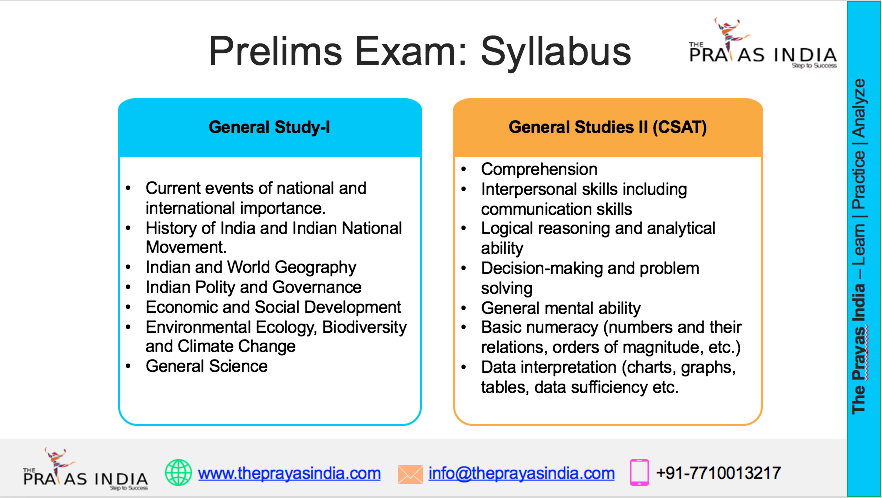
UPSC CSE 2026-27 Detailed Syllabus
2) Live Photo Capture is Now Mandatory in CAF
A major new rule in UPSC CSE 2026 is the introduction of live photo capture.
Candidates must:
- Upload a recent passport-size photograph
- Capture a live photo using:
- webcam OR
- mobile QR-based capture
Why This Matters
UPSC has warned that:
- The live photo must be clear and properly lit
- It must match the uploaded photo
- Any mismatch can lead to rejection of the application
3) Triple Signature Upload is Required
Another major update is the new signature requirement.
Candidates must:
- Sign three times vertically
- On a plain white paper
- Using black ink
- Upload as a single JPG file
Signature File Requirements (as per UPSC)
- Format: JPG
- Size: 20 KB – 100 KB
- Dimension: approx. 350–500 px
- Orientation: Upright
- Proper spacing between signatures
- Filename should be: signature
This is an important change, and many candidates may get rejected if they upload incorrect signatures.
4) Face Authentication at Exam Centre (Mandatory)
UPSC has introduced mandatory face authentication at the exam venue.
This will be done during:
- entry verification
- identity confirmation
- frisking process
Candidate Advice
UPSC has advised candidates to:
- reach the centre well in time
- expect additional time for face authentication
UPSC CSE 2027-28 New Batches
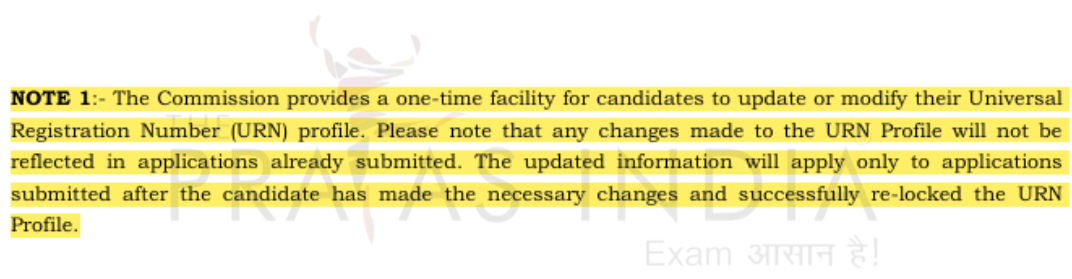
5) One-Time URN Profile Update Facility
The URN (Universal Registration Number) is now permanent.
But UPSC has allowed only one profile update in the URN.
Key Points
- URN remains the same forever
- Candidates can update the URN profile only once
- After the update, the URN is re-locked
- Changes apply only to future forms
- Already submitted applications will not change
This makes it extremely important to fill URN details carefully.
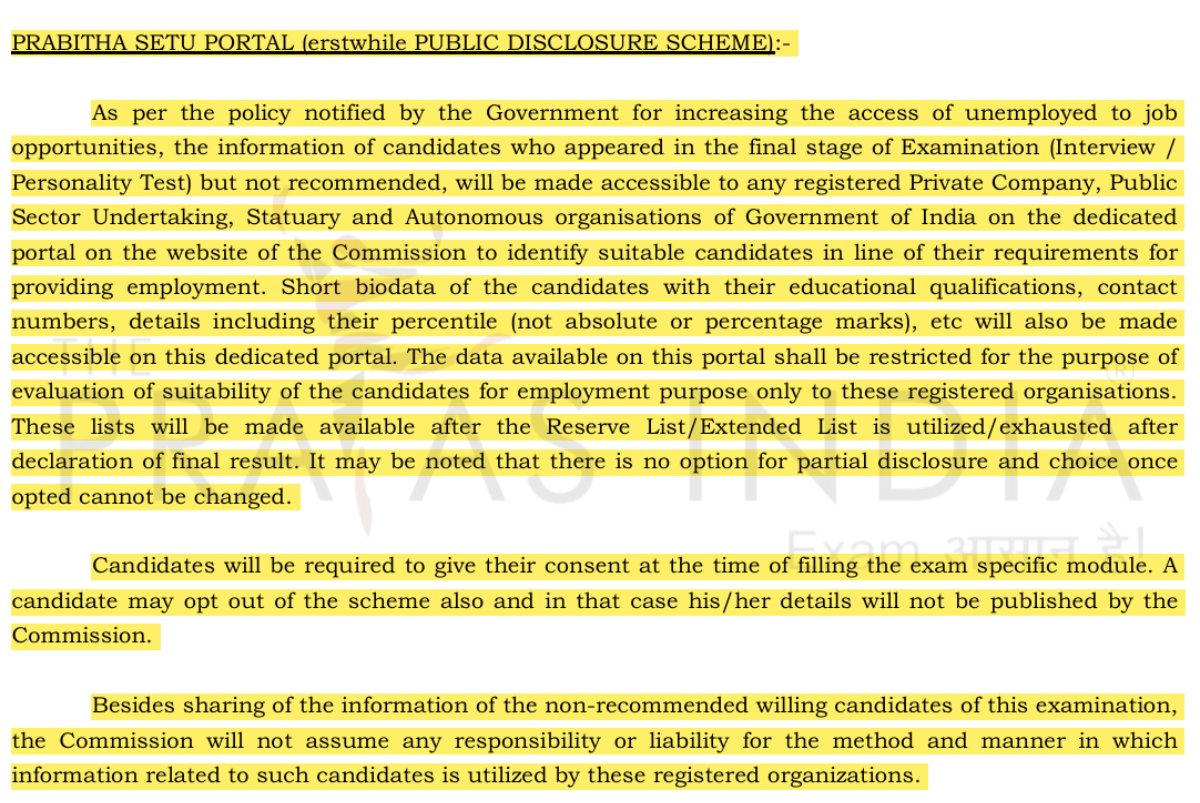
6) Pratibha Setu Portal (Earlier Public Disclosure Scheme)
UPSC has also introduced the Pratibha Setu Portal, which replaces the earlier Public Disclosure Scheme.
Who Comes Under It?
Candidates who:
- reach the Interview / Personality Test stage
- but are not finally recommended
What Data May Be Shared?
UPSC may share details like:
- educational qualification
- contact information
- percentage (not marks)
Important Rule
Consent is required in the exam module.
- Candidates may opt out
- But once opted in, the choice cannot be changed later
This portal is mainly for enabling employment opportunities through the Government/PSU organizations.
UPSC CSE Exam 2026-27 Test Series
7) Aadhaar-Based Verification Strongly Recommended
UPSC Notification 2026 has encouraged candidates to use Aadhaar as the primary identity document.
Benefits of Aadhaar Verification
- faster identity checks
- smoother verification across stages
- reduced delays
- better accuracy
Alternative IDs Allowed
If Aadhaar is not used, candidates can upload:
- Voter ID
- PAN Card
- Passport
- Driving Licence
8) No Withdrawal & No Correction After Final Submission
This is one of the most serious changes in UPSC 2026.
UPSC has clearly stated:
❌ No withdrawal allowed after submission
❌ No correction allowed in any field after submission
That means:
- If you make a mistake, you cannot edit it later
- You must verify everything before final submission
9) Restrictions on Applying for CSE 2026 (Very Important)
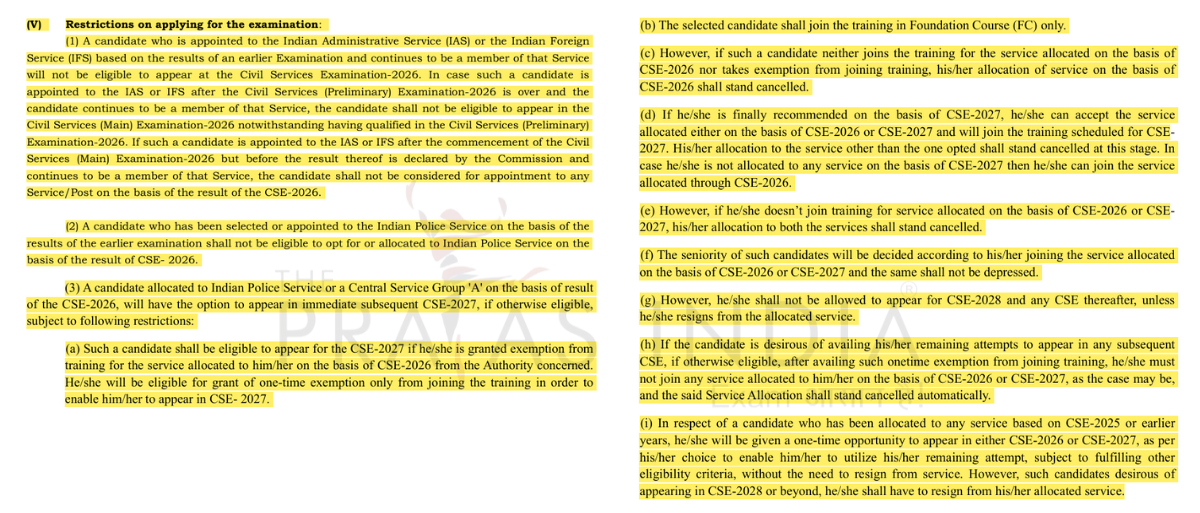
UPSC CSE 2026 notification includes strict rules for candidates who are already:
- allocated a service
- in training
- appointed through earlier CSE/IFoS cycles
This section is especially important for:
- already selected candidates
- IPS/Group A service candidates
- candidates planning to reappear for better service
Key Service Restriction Rules in UPSC CSE 2026
A) IAS and IFS Candidates Cannot Apply
If a candidate is already appointed to:
- IAS OR
- IFS
Then they cannot appear in CSE 2026 at all.
Even if appointment happens after prelims, such candidates will not be allowed to continue for Mains or final allocation.
B) IPS Candidates Can Apply, But Cannot Choose IPS Again
Candidates already appointed to IPS may:
-
apply and appear in CSE 2026
But:
-
they cannot give IPS as preference again
C) One-Time Improvement Attempt for CSE 2026 Selectees
If a candidate gets:
-
IPS or any Group A Central Service in CSE 2026
Then UPSC allows:
-
one improvement attempt in CSE 2027
This is linked with:
-
one-time training exemption facility
D) If Training Not Joined or Exemption Not Taken
If a CSE 2026 selectee:
-
does not join training
-
and also does not take exemption
Then:
-
their service allocation is cancelled
E) If Candidate Gets Better Service in CSE 2027
If the candidate appears in CSE 2027 and gets a better service:
- they must choose between 2026 and 2027 allocation
- the other allocation is cancelled automatically
F) If Candidate Does Not Get Any Service in CSE 2027
Then:
- they may return to the service allocated in CSE 2026
- and join training
G) Not Joining Training of Final Chosen Service
If the candidate does not join training of the final chosen service (from 2026 or 2027), then:
-
both allocations get cancelled
H) Restriction After Using Improvement Attempt
Once the one improvement attempt is used in CSE 2027:
-
the candidate cannot appear in CSE 2028 onwards
-
unless they resign from service
I) Candidates Allocated in CSE 2025 or Earlier
Candidates already in any service from CSE 2025 or earlier:
-
can appear once in either CSE 2026 or CSE 2027 without resigning
But:
-
to appear in CSE 2028 or later, resignation becomes mandatory
How to Fill UPSC CSE 2026 Application Form (Step-by-Step)
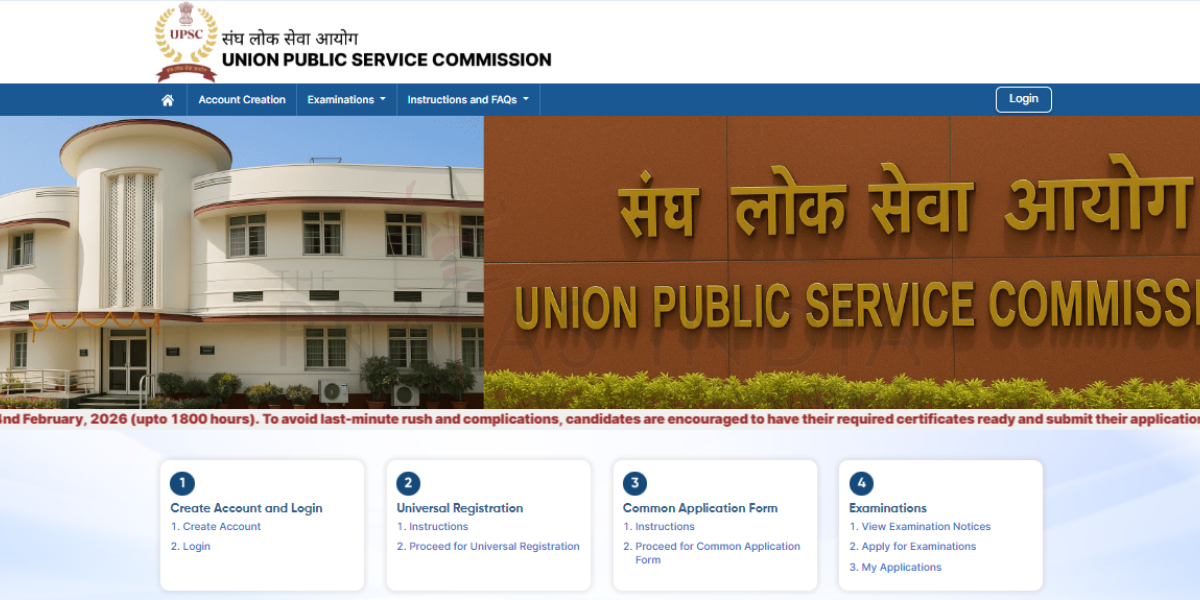
UPSC has clarified that the form must be filled out only through the official portal.
Official Portal
The complete application process follows the 4-card structure.
Step 1: Account Creation
- Register with active email and mobile number
- Verify through OTP
- Set password and login credentials
UPSC uses these details for all future communication.
Step 2: Universal Registration (URN Generation)
Fill identity and matriculation details.
Once submitted:
- URN is generated
- URN is permanent for all UPSC exams
Step 3: Fill the Common Application Form (CAF)
CAF has 10 profile sections. Candidates can fill them in any order, except the final Photo & Signature section.
CAF Profiles
- Personal Profile
Nationality, mother tongue, marital status, domicile, birth details etc. - Parents’ Profile
Father, mother, or guardian details. - Social Category Profile
General/SC/ST/OBC/EWS + certificate details. - Disability Profile
PwD/PwBD details with certificate. - Address Profile
Permanent and correspondence address + parent address. - Educational Profile
Academic details from 10th onwards. - Employment Experience Profile
Job/self-employed details (if any). - Achievements Profile
Awards, scholarships, NCC, sports etc. - Previous UPSC Exams Profile
Previous attempts, roll numbers etc. - Photo & Signature Profile
Upload photo, capture live photo, upload triple signature.
Step 4: Examination Module (CSE 2026 Form)
Before entering this step, candidates must lock CAF.
Then in the exam module, candidates must:
- select CSE 2026
- choose prelims & mains centres
- choose medium and language
- pay fee (if applicable)
- submit final form
After submission:
- Application Number is generated
- no correction or withdrawal is allowed
UPSC Helpdesk for CSE 2026 Applicants
UPSC has provided a dedicated helpline for candidates facing technical issues.
- Helpline Number: 011-24041001
- Email: upscoap@nic.in
- Working Hours: 10:00 AM to 5:30 PM
- Operational Dates: 4 Feb 2026 to 24 Feb 2026
This support can be used for:
- payment issues
- uploading errors
- portal login problems
- application-related queries
Common Mistakes to Avoid While Filling UPSC CSE 2026 Form
Many candidates lose their chance due to small errors. Since UPSC 2026 has removed correction options, you must be extra careful.
Avoid These Mistakes:
- Do not start form filling without reading the notification fully
- Do not assume old OTR system still exists
- Check name and DOB exactly as per Matriculation certificate
- Verify every detail before locking CAF
- Follow photo + live photo instructions properly
- Upload triple signature exactly in required format
- Enter correct category and certificate details
- Fill achievements carefully (interview questions often come from here)
- Understand service restriction rules before applying
- Avoid last-day submission to prevent server issues
- Save URN, Application Number and final confirmation PDF safely
UPSC Notification 2026 FAQs
1. Is UPSC Notification 2026 officially released?
Yes. UPSC released the CSE 2026 notification on 4 February 2026.
2. What is the last date to apply for UPSC CSE 2026?
The last date to apply is 24 February 2026 (6:00 PM).
3. What are the major UPSC 2026 new rules?
Major changes include:
- new 4-card portal
- mandatory live photo capture
- triple signature upload
- face authentication at exam centre
- no correction or withdrawal after submission
- one-time URN update
- stricter rules for already allocated officers
4. What is the URN in UPSC 2026?
URN stands for Universal Registration Number.
It is a permanent registration number that remains valid for all UPSC exams.
5. What is the UPSC CSE 2026 application fee?
- ₹100 for General/OBC candidates
- Fee exemption for:
- women candidates
- SC/ST candidates
- PwBD candidates
6. How many vacancies are announced for UPSC CSE 2026?
UPSC has indicated approximately 933 vacancies.
7. Where can I download the UPSC CSE 2026 notification PDF?
The official notification PDF can be downloaded from the UPSC official website.
Conclusion
UPSC CSE 2026 has introduced major changes that directly affect how candidates register, upload documents, verify identity, and submit applications. The removal of correction and withdrawal options, along with mandatory live photo capture and triple signature upload, makes it necessary for candidates to fill the form carefully.
Additionally, the new restrictions for already allocated IAS/IFS/IPS and Group A service candidates make the eligibility rules stricter than before.
Every aspirant is advised to complete the application process early, prepare documents in advance, and preserve their URN and Application Number for future reference.



![Prayas-तेजस [UPSC CSE Sociology Optional] – Online & Offline](https://theprayasindia.com/wp-content/uploads/2025/09/Prayas-तेजस-UPSC-CSE-Optional-Subject-The-Prayas-India-300x300.png)
![Prayas-सूत्र [UPSC CSE Materials (Hardcopy)]](https://theprayasindia.com/wp-content/uploads/2025/09/Prayas-सूत्र-UPSC-CSE-Study-Materials-Hardcopy-The-Prayas-India-300x300.png)
![Prayas-मंत्रा [UPSC CSE CSAT]](https://theprayasindia.com/wp-content/uploads/2025/09/Prayas-मंत्रा-UPSC-CSE-CSAT-The-Prayas-India-300x300.png)
![Prayas सारथी [UPSC CSE One on One Mentorship]](https://theprayasindia.com/wp-content/uploads/2025/09/Prayas-सारथी-UPSC-CSE-One-on-One-Mentorship-The-Prayas-India-300x300.png)